Yuhox Space.
One workbench for tuning equipment and repairing boards: verify on a virtual device first, then connect the real one to change parameters, back up and flash firmware.
How to start
See the price and order
After payment, the license appears under Console → My licenses. Nothing is issued until the money arrives.
Collect the license in the software
In System settings → License, click “Get license with Yuhox account”. You do not copy a license code.
Machines without internet
Use Console → Offline activation / transfer. The license code is a secret; it is masked by default.
What it solves
The thing people tuning industrial equipment fear most: one mistyped parameter and the machine crashes into something. Changing elevator parameters on site means manuals plus experience, and the change goes straight to the board. One wrong decimal point and the car hits the top or slams the bottom — at best the elevator is out of service for a day, at worst parts are destroyed. Yuhox Space puts device configuration, logic configuration, virtual simulation, 3D rehearsal and real-machine debugging into one workbench. Run it on the virtual device first, apply to the real machine only after it passes; every write is backed up automatically, and you can roll back to the previous version any time. Board problems don't need another tool either: connect an emulator to identify the main control chip, back up the factory firmware, then flash; on the bench, light outputs one by one to build a mapping and analyze firmware offline, so faults are found faster.
Before and now
| Before | Now |
|---|---|
| Change a parameter and push it straight to the board — you only find out when something goes wrong | Run the same parameters on the virtual elevator first — if the rehearsal fails, you can't proceed |
| New hires have to wait for a free real elevator, and only one person can work at a time | One computer per person, each a virtual elevator — try anything, inject any fault |
| No backup before writing to the real machine — if a write goes wrong, you're reverting from memory | Every write auto-reads back and saves the current value — roll back to the previous version if a write goes wrong |
| Simulation is one thing, the field is another — when they don't match, you're just guessing | The 3D view is driven by the simulation state — if the values are wrong, nothing moves |
| Switching to a different device used to mean switching to a different piece of software | One device type is one device package. What ships now is the elevator, plus a free PLC example package; the workbench needs no relearning |
| A broken board goes back to the factory; with no backup of the factory firmware, a bad flash is unrecoverable | Connect a debug probe, back up factory firmware before flashing, and find faults by mapping indicators on the bench |
Core capabilities
- 01
No coding required
Configure the device tree, parameter table, and logic diagram, and you have a complete configuration — no programming required.
- 02
Run it on the virtual device first
The whole device runs inside your computer, faults included: rope break, overspeed, door jam — see them all in the virtual world first.
- 03
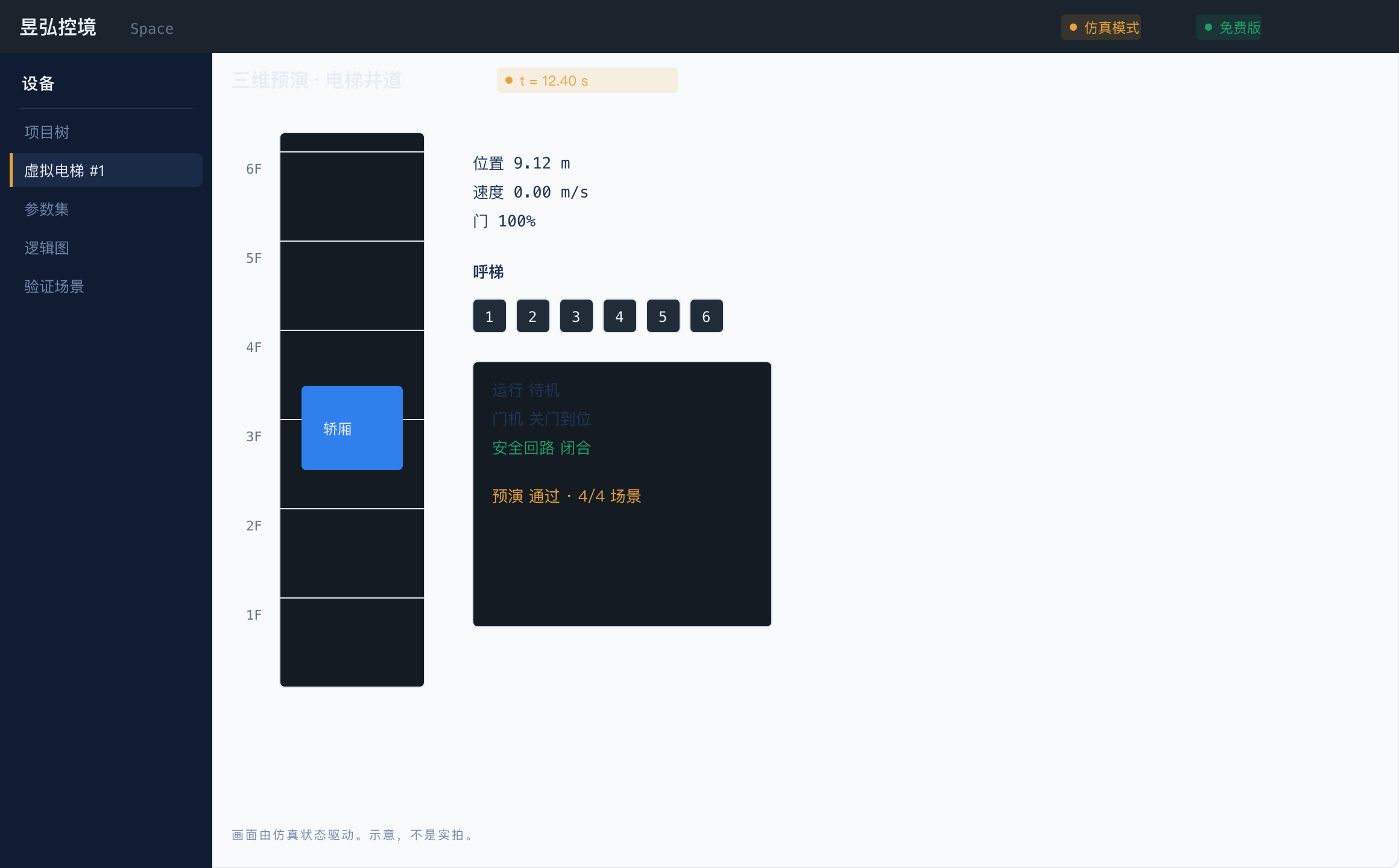
The 3D view is driven by the simulation
Motion on screen isn't animation; it's the real state of the simulation. If the numbers don't add up, the picture won't move.
- 04
Writing is only allowed after the rehearsal passes
Before parameters go to the real machine, they must pass validation and rehearsal — anything that fails can't go through.
- 05
Simulation and the real machine are strictly isolated
The two modes have different colors and different entry points on screen — nothing you do in virtual mode ever reaches the real device.
- 06
Read chips, back up and flash firmware
Plug in a debug probe to identify the board's MCU; back up the factory firmware before flashing, and fix the probe driver in one click.
- 07
Repair diagnostics
Light indicators one by one on the bench to build a map and analyze firmware structure offline to find faults faster. For repair and your own equipment only.
- 08
Quick setup and onboarding
Answer a few questions to configure an elevator, with linked parameters corrected automatically; a checklist walks you through your first run.
- 09
Switching devices only means switching the device pack
One device type is one package: parameters, logic, simulation and UI all inside. The free PLC example package is given exactly as the pattern for writing your own device package; adding a device type means building a package, not relearning the workbench.
Who it is for
Elevator commissioning engineers
Watch how the virtual elevator moves before touching the real machine
Equipment manufacturers and system integrators
Bid demos and training no longer need to tie up a real elevator
Crews training new hires
Get comfortable on your computer first, then move to the control cabinet
Board repair and maintenance companies
Identify chips, back up and flash firmware, find faults on the bench
Why this one
Everything read-only is free forever
Simulation, 3D rehearsal, logic/parameter editing, smart setup, onboarding and chip identification are free, need no activation, and never expire. Without a license code it's the free edition — install and start working.
Writing is only allowed after the rehearsal passes
Before parameters go to the real machine, they must pass validation and rehearsal. What fails can't go through — this is enforced in code, not just a warning message.
Virtual mode never touches the real machine
In simulation mode, no connection to any real device is ever established. The two modes have different colors and different entry points.
Always back up before writing to the real machine
Before every write to the device, the current value is automatically read back and saved.
Always back up before flashing
Flashing is disabled until the factory firmware is backed up, and you must type the chip model to confirm.
Repair diagnostics stay on the bench
Writing memory to light indicators requires bench mode and accepting the terms; analysis results stay on your machine.
Same job, two ways
The left column is how most sites work today — no vendor names. The right column is what the current version actually does.
| Topic | Common practice | Yuhox Space |
|---|---|---|
| Change parameters | Change it by the manual, push it, and only stop the elevator once something goes wrong | Run it on the virtual elevator first — if the rehearsal fails, you can't write to the real machine |
| Training | Waiting for a real elevator to free up, and only one person can stand at the cabinet | One computer per person, each a virtual elevator |
| Write to the real machine | No backup — if a write goes wrong, you're reverting from memory | Automatically backed up before every write, roll back anytime |
| Switch devices | Buying yet another dedicated piece of software | Swap the device pack, keep the same workbench |
| Board repair | Ship it back to the factory, no factory firmware backup | Identify the chip on site, back up before flashing |
Key parameters
| Form | Desktop workbench (Electron + native Go core) |
|---|---|
| Platform | Windows 7+ / macOS 12+ / Linux (by email request) |
| Device packages available now | Elevator control system (ELSC05 board: virtual simulation, rehearsal and flashing all work; the real-machine protocol is integrated per project) + a free PLC example package |
| Free | Simulation, 3D, logic, parameter editing, smart setup, onboarding, chip identification, sample device packs |
| Paid | Device writes, firmware backup and flashing, repair diagnostics, full device packs (Engineering edition and up) |
Up front
Can I use it without buying a license?
Yes. Simulation, 3D rehearsal, logic/parameter editing, smart setup, onboarding, chip identification, and sample device packs are free and never expire. What's paid is device writes, firmware backup and flashing, repair diagnostics, and full device packs.
Can it be demoed without a real elevator?
Yes. Double-click to launch and watch the virtual elevator run — change the floor count, inject faults, run rehearsals, all without any hardware.
What devices are supported right now?
Only two packages: the elevator control system, and a free PLC example package (it shows how a device package is written, so you can build one for your own equipment). Robots and variable-frequency drives aren't done yet. The real-machine protocol needs documentation from the manufacturer and is integrated per project — it doesn't work universally once installed.
Can it repair boards?
Yes. Connect a J-Link, ST-Link or CMSIS-DAP probe: chip identification is free, factory firmware backup is in the Engineering edition, flashing and repair diagnostics are in Professional. For repair and your own equipment only — never flash or write memory on an elevator in service.
Can it be cracked?
Paid features execute inside the Go process, and official device packages are encrypted. If the package can't be opened, the real-machine functionality might as well not exist — it isn't a switch in the UI.
Hard constraints in the system
These are gates in the software — even a code change is not allowed to remove them. What is in the contract still governs.
Everything read-only is free forever
Simulation, 3D rehearsal, logic/parameter editing, smart setup, onboarding, and chip identification are free, need no activation, and never expire. What's paid is real-machine writes, firmware backup and flashing, repair diagnostics, and full device packs.
Always back up before writing to the real machine
Before every write to the device, the current value is automatically read back and saved — if a write goes wrong, you can roll back to the previous version.
Virtual mode never touches the real machine
In simulation mode, no connection to any real device is ever established — this is a hard isolation enforced in code, not just an on-screen notice.
One account, multiple systems
If you use several Yuhox systems, one account covers them all. No separate accounts or passwords per system.
Run it on your computer first
Install it and you have a virtual elevator; plug in a debug probe and it recognizes the board. Everything read-only is free — buy a license when it proves useful.